

Is a Desktop Fiber Laser Marking Machine Right for Your Business?
A desktop fiber laser marking machine can be a smart investment for manufacturers, workshops, parts suppliers, and small businesses that need fast, permanent, and precise product identification. Unlike traditional engraving equipment, a fiber laser marking system uses a concentrated laser beam to create highly accurate marks without direct contact with the workpiece.
But is a desktop system actually right for your business?
The answer depends on what you manufacture, how often you mark products, the materials you process, your available workspace, and your production targets. A small workshop producing a few hundred metal components per week has very different needs from an automotive supplier running thousands of parts every day.
The good news is that modern desktop fiber laser marking machines can bridge that gap. They provide industrial-level marking performance in a relatively compact format, making them attractive when floor space, budget, and flexibility all matter.
This guide explains the major advantages, applications, specifications, costs, and purchasing considerations so you can make a confident decision.
What Is a Desktop Fiber Laser Marking Machine?
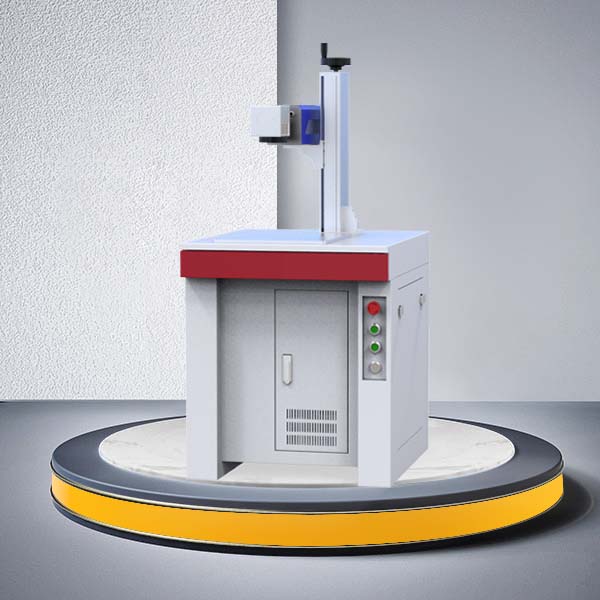
A desktop fiber laser marking machine is a compact laser engraving and marking system designed primarily for processing metal and certain other materials. It typically combines a fiber laser source, galvo scanning head, focusing lens, control system, marking software, and worktable into a relatively small workstation.
The word “desktop” doesn't necessarily mean the machine is designed for casual or hobby use. In many cases, desktop systems are built for professional manufacturing environments where operators need reliable marking but don't require a large automated production line.
Fiber lasers are particularly effective because their wavelength is well suited to many metals. Depending on the configuration, the machine can mark stainless steel, carbon steel, aluminum, brass, copper, titanium, and other materials.
Typical marking tasks include:
Serial numbers
QR codes
Barcodes
Logos
Product names
Data matrix codes
Part numbers
Model numbers
Identification codes
Decorative patterns
Scale markings
Traceability information
The machine doesn't need physical contact with the material. Instead, the scanning system directs the laser beam across the target area according to the programmed design.
For businesses, that means fewer consumable tools and a repeatable marking process.
How Does a Fiber Laser Marking Machine Work?
The basic process is relatively straightforward.
First, the fiber laser source generates a laser beam. The beam then travels through the optical system to a galvanometer scanning head. Mirrors inside the scanning head move the beam rapidly across the work surface.
The marking software controls this movement.
Depending on the selected parameters, the laser can change the surface in several ways. It may remove a thin layer of material, alter the surface color, create a shallow engraving, or produce a deeper mark.
The exact result depends on factors such as:
Laser power
Pulse frequency
Pulse duration
Marking speed
Hatch spacing
Focus position
Material type
Surface condition
Number of passes
This flexibility is one reason fiber laser marking has become useful across manufacturing industries.
For example, a manufacturer may use a lower-energy setting for a high-contrast surface mark but use multiple passes and different parameters when deeper engraving is required.
Because the laser is digitally controlled, the same design can be reproduced with excellent consistency.
Why Are Desktop Fiber Laser Marking Machines So Popular?
The popularity of desktop fiber laser marking systems comes down to a combination of size, precision, flexibility, and operating efficiency.
Traditional engraving systems may require cutting tools, fixtures, replacement bits, and frequent mechanical adjustment. A laser marking system eliminates many of these mechanical limitations.
A desktop system can also be easier to integrate into smaller production areas.
For companies that don't need a large automated marking line, purchasing a huge industrial system may be unnecessary. A compact machine can provide enough working area and laser power for many common applications while using less floor space.
Another advantage is digital production. Operators can quickly change the marking file without replacing physical tooling.
That makes the technology particularly useful for companies producing multiple product models or customized components.
7 Powerful Signs Your Business Needs a Desktop Fiber Laser Marking Machine
1. You Mark Metal Parts Regularly
If your business frequently marks metal components, a desktop fiber laser marking machine may be worth considering.
Metal parts are common in industries such as automotive manufacturing, electronics, machinery, tools, hardware, and industrial equipment.
Instead of outsourcing every marking job, companies can bring the process in-house.
2. You Need Permanent Identification
Laser markings are ideal when product information needs to remain readable throughout the product's service life.
Permanent identification can help manufacturers maintain traceability and reduce confusion between similar components.
This is particularly important for parts that may experience handling, abrasion, or exposure to industrial environments.
3. You Frequently Change Product Information
Does your production team constantly change serial numbers, model numbers, or QR codes?
If so, digital laser marking can make the workflow much easier.
Operators can simply load a different marking file or update the variable information. There's no need to create a new physical engraving tool for every product variation.
4. Your Business Has Limited Floor Space
A desktop configuration can be attractive for smaller factories and workshops because it requires less space than a large integrated marking line.
This doesn't mean you should ignore ventilation, safety, or operator access. However, the compact footprint can make installation easier.
5. You Want to Reduce Outsourcing
Outsourcing laser marking adds several hidden costs.
You may need to:
Package and transport parts
Wait for another supplier
Meet minimum order quantities
Manage additional quality checks
Handle urgent jobs separately
An in-house desktop fiber laser marking machine can give your team more control over scheduling and quality.
6. You Need High Marking Accuracy
Fiber laser systems are capable of producing fine details and small characters.
This matters when marking compact components where available surface area is limited.
QR codes, data matrix codes, small serial numbers, and detailed logos can often be produced much more cleanly than with conventional mechanical engraving methods.
7. Your Production Volume Is Growing
A machine that seems unnecessary today may become valuable as your business grows.
If your current marking workload is increasing every month, bringing the process in-house can improve production flexibility.
The important point is to calculate actual throughput rather than simply buying the highest-power machine available.
What Materials Can a Desktop Fiber Laser Mark?
A major strength of fiber laser technology is its compatibility with a wide range of metals.
Common materials include:
| Material | Typical Applications |
|---|---|
| Stainless steel | Kitchenware, medical components, machinery |
| Aluminum | Electronics, automotive parts, housings |
| Carbon steel | Industrial components and tools |
| Brass | Electrical components and hardware |
| Copper | Electrical and electronic parts |
| Titanium | Aerospace, medical, and high-performance components |
| Iron | Machinery and hardware |
| Anodized aluminum | Consumer products and electronics |
| Coated metals | Identification and decorative marking |
Some desktop fiber laser marking machines can also process certain plastics and coated materials, although the result depends heavily on the material formulation.
If your business primarily processes wood, glass, acrylic, leather, or other non-metal materials, a different laser technology may be more appropriate.
This is why material testing should happen before purchasing.
Common Industrial Applications
A desktop fiber laser marking machine can serve many industries.
Automotive Parts
Automotive manufacturers and suppliers often need permanent identification on components.
Typical markings include:
Part numbers
Serial numbers
Manufacturing codes
QR codes
Logos
Traceability information
Because parts can have complex shapes, the machine's working area and focusing system should be selected carefully.
Electronics Manufacturing
Electronics companies often need small, precise markings.
Fiber lasers can mark housings, connectors, tools, components, and metal plates without requiring mechanical contact.
Hardware and Tools
Hand tools, cutting tools, fasteners, bearings, and hardware products can benefit from permanent branding and identification.
For branded products, a clean logo can also contribute to perceived product quality.
Medical Components
Some metal medical components require permanent identification and traceability.
However, companies serving regulated medical markets should evaluate material compatibility, cleaning processes, validation requirements, and applicable regulations before selecting equipment.
Jewelry and Personalized Products
Lower-power or appropriately configured fiber laser systems can be used for jewelry marking and personalization.
Names, dates, symbols, serial numbers, and small decorative designs can be produced with high precision.
Industrial Equipment
Manufacturers of pumps, valves, motors, electrical equipment, and machinery can use laser marking to identify components and improve traceability.
Desktop vs. Portable vs. Industrial Fiber Laser Marking Machines
Not every business needs the same machine format.
| Feature | Desktop | Portable | Industrial |
|---|---|---|---|
| Footprint | Small | Very flexible | Large |
| Mobility | Limited | High | Low |
| Production volume | Low to medium | Low to medium | Medium to high |
| Automation | Moderate | Limited to moderate | High |
| Integration | Moderate | Moderate | Excellent |
| Typical use | Workshops and factories | Field and irregular parts | Production lines |
| Initial investment | Moderate | Moderate | Higher |
A desktop machine is often the middle ground.
If you need to move between different production locations, a portable system may make more sense.
If your operation runs continuously and requires conveyor integration, robotic loading, or high-volume automation, an industrial system may be the better choice.
In other words, don't buy a Ferrari when a reliable pickup truck will do the job.
What Specifications Should You Consider?
Choosing the right machine requires more than comparing advertised laser power.
Laser Power
Common configurations vary by manufacturer and application.
Higher power can improve processing speed or support deeper marking, but more power isn't automatically better.
A business focused on fine identification marks may not need the same power as a manufacturer performing deep engraving.
Marking Area
The lens determines the available marking field.
A larger field allows you to mark larger components, while a smaller field may provide advantages for certain fine-detail applications.
Consider the largest product you expect to mark regularly rather than selecting a field based only on today's smallest parts.
Laser Source
The laser source is one of the machine's most important components.
When comparing suppliers, consider:
Source manufacturer
Expected service life
Warranty
Replacement availability
Technical support
Long-term reliability
Galvanometer Scanner
The scanning head controls how rapidly and accurately the laser beam moves.
A high-quality scanner can contribute to better consistency, especially when marking small graphics or high-density codes.
Focusing System
Accurate focus is essential for clean marking.
Depending on the machine design, focusing may involve a manual adjustment system or an assisted focusing mechanism.
Software
Don't overlook software.
A powerful laser with poor software can create unnecessary headaches.
Look for software that supports common vector and image formats and allows variable text, serial numbering, QR codes, barcodes, and parameter control.
Why Marking Speed Matters
Production speed directly affects the return on investment.
However, the advertised maximum speed shouldn't be treated as the actual production speed.
Real-world throughput depends on:
Material
Marking depth
Graphic complexity
Laser power
Hatch settings
Number of passes
Part positioning
Operator workflow
For example, a simple serial number may be marked very quickly, while a large filled logo may take considerably longer.
Therefore, ask suppliers for actual sample results using your own parts.
This is one of the best ways to compare machines fairly.
How Important Is Marking Quality?
For many businesses, marking quality is just as important as speed.
A good mark should have:
Sharp edges
Consistent contrast
Accurate dimensions
Stable character shapes
Good code readability
Minimal unwanted heat effects
The ideal appearance depends on the application.
For example, a QR code needs reliable contrast and geometry so it can be scanned. A decorative logo may require a different surface finish.
This is why testing the exact material is critical.
Software and Automation Features
Modern marking software can do much more than display a logo.
Useful functions may include:
Automatic serial numbering
Date and time marking
QR code generation
Barcode generation
Variable text
Database integration
Batch processing
Graphic editing
Parameter libraries
Multiple marking files
For businesses with repetitive production, these features can save significant operator time.
A machine should fit your workflow rather than force your workflow to fit the machine.
Safety Requirements You Shouldn't Ignore
Laser marking equipment should always be treated as industrial equipment, not simply as another desktop printer.
Laser radiation can present serious hazards depending on the laser class and configuration. The U.S. FDA explains that industrial lasers can fall into high-hazard classifications, and appropriate controls are necessary to manage exposure risks.
Safety considerations may include:
Protective enclosure
Interlock system
Warning labels
Appropriate laser safety eyewear
Fume extraction
Emergency stop
Operator training
Controlled access
Proper installation
Requirements vary according to the equipment and country.
For businesses selling or importing equipment into the United States, the FDA provides information about laser product performance and applicable regulations.
FDA Laser Products and Instruments guidance
Never choose a machine solely because it is cheap or compact. Safety engineering should be part of the purchasing decision from day one.
How Much Does a Desktop Fiber Laser Marking Machine Cost?
The purchase price varies widely depending on configuration.
Important cost factors include:
Laser power
Laser source
Scanner
Lens
Enclosure
Rotary attachment
Autofocus system
Software
Fume extraction
Warranty
Installation
Training
A lower initial price doesn't necessarily mean lower total cost.
For example, a machine with weak technical support may create expensive downtime later. Similarly, a machine that can't handle your required production speed may force you to replace it sooner than expected.
Instead of asking only, “How much does the machine cost?”, ask:
“How much will it cost to mark each part over the machine's useful life?”
That is a much better purchasing question.
How to Calculate Potential ROI
A simple ROI evaluation can compare your current outsourcing expenses with the expected cost of in-house production.
Consider:
Current annual marking cost = outsourcing cost + transportation + handling + quality inspection + delays
Then compare this with:
In-house annual cost = equipment depreciation + electricity + maintenance + labor + consumables
If the in-house process costs less while providing acceptable quality and throughput, the investment may make financial sense.
But cost isn't everything.
Faster turnaround, better traceability, production flexibility, and reduced dependence on outside suppliers can also have significant business value.
Maintenance and Operating Costs
One attractive feature of fiber laser marking is that it generally has fewer mechanical wear components than traditional contact-based engraving systems.
Still, maintenance is necessary.
Operators should keep the machine clean, inspect optical components, maintain the work area, and follow the manufacturer's maintenance schedule.
Potential maintenance considerations include:
Lens cleaning
Scanner inspection
Electrical checks
Cooling system checks
Dust management
Fume extraction maintenance
Software updates
Environmental conditions matter too.
Excessive dust, poor ventilation, unstable power, or inappropriate operating temperatures can affect equipment performance.
A clean production environment isn't just good housekeeping. It can help protect your investment.
How to Choose the Right Desktop Fiber Laser Marking Machine
Before requesting quotations, make a list of your actual requirements.
Step 1: Define Your Materials
List every material you currently mark.
Don't assume that a machine that works perfectly on stainless steel will deliver the same results on every material.
Step 2: Measure Your Largest Workpiece
Determine the dimensions and weight of typical parts.
Then consider whether you need a standard worktable, rotary axis, or another fixture.
Step 3: Define Your Marking Requirements
Identify whether you need:
Surface marking
Deep engraving
Color marking
QR codes
Barcodes
Logos
Serial numbers
Large-area marking
Step 4: Estimate Daily Production
Calculate how many parts you need to mark per hour or per day.
This will help you avoid both underbuying and overbuying.
Step 5: Test Real Samples
Send representative samples to potential suppliers.
Ask for actual marking tests using your desired text, logo, code, and material.
Step 6: Compare the Complete Package
Compare more than the laser source.
Evaluate the entire system, including:
Machine structure
Scanner
Lens
Software
Safety system
Accessories
Warranty
Technical support
Spare parts
Step 7: Consider Future Growth
Your machine should ideally support your expected business requirements for several years.
Buying a system that barely meets today's needs may create limitations as production grows.
Conclusion
So, is a desktop fiber laser marking machine right for your business?
If you regularly mark metal products and need permanent, accurate, repeatable identification without taking up a large amount of factory space, it can be an excellent option.
The strongest reasons to consider one are its precision, digital flexibility, compact footprint, low-contact processing method, and ability to handle common industrial marking tasks.
Still, don't make the purchasing decision based on laser power or price alone. Start with your materials, product dimensions, marking requirements, production volume, and workflow. Then compare machines based on real sample results, software capabilities, safety features, technical support, and total ownership cost.
A well-matched desktop fiber laser marking machine isn't simply a piece of equipment. It can become a practical production tool that improves traceability, shortens turnaround times, and gives your business greater control over product marking. For more plasae contact JCZ
Previous
None
If you are interested in sending in a Guest Blogger Submission,welcome to write for us!
Comments
0